Marketing handoffs / Onboarder and Hub
The onboarder screens and the Hub
What a person sees when a Tangible plugin first runs on their site, the page they land on afterwards, and how to change either with a pull request.
How the pieces fit
Everything on this page lives in one repository, TangibleInc/framework, in three folders: onboarding/ (the wizard shell and its core steps), connect/ (the "Connect to tangible.one" step for free plugins) and hub/ (the Tangible Home page). The updater repo has no onboarder or Hub code. The Hub only reads its licence status.
The wizard is not a fixed sequence. Each plugin registers its own steps, and the framework adds the ones every plugin shares. Which steps appear is worked out fresh from the site's facts each time, so a question that was already answered somewhere else is never asked again.
The two plugins in the screenshots show both shapes. Their rails differ because each plugin contributes its own steps:
- Design Upgrade for LearnDash (free): Tangible.one, Optional, Compatibility, This site, Done. "Compatibility" is the plugin's own step.
- Design Upgrade Pro for LearnDash (paid): Licence, Optional, This site, Done.
The onboarder screens
Four default screens, plus a fifth that replaces the first on free plugins. They are shown at about 1440px wide. Click any image for the full size.
1a. Licence Paid plugins
Always the first step on a paid plugin, and it cannot be skipped. It does not exist on free plugins, because there is nothing to activate.
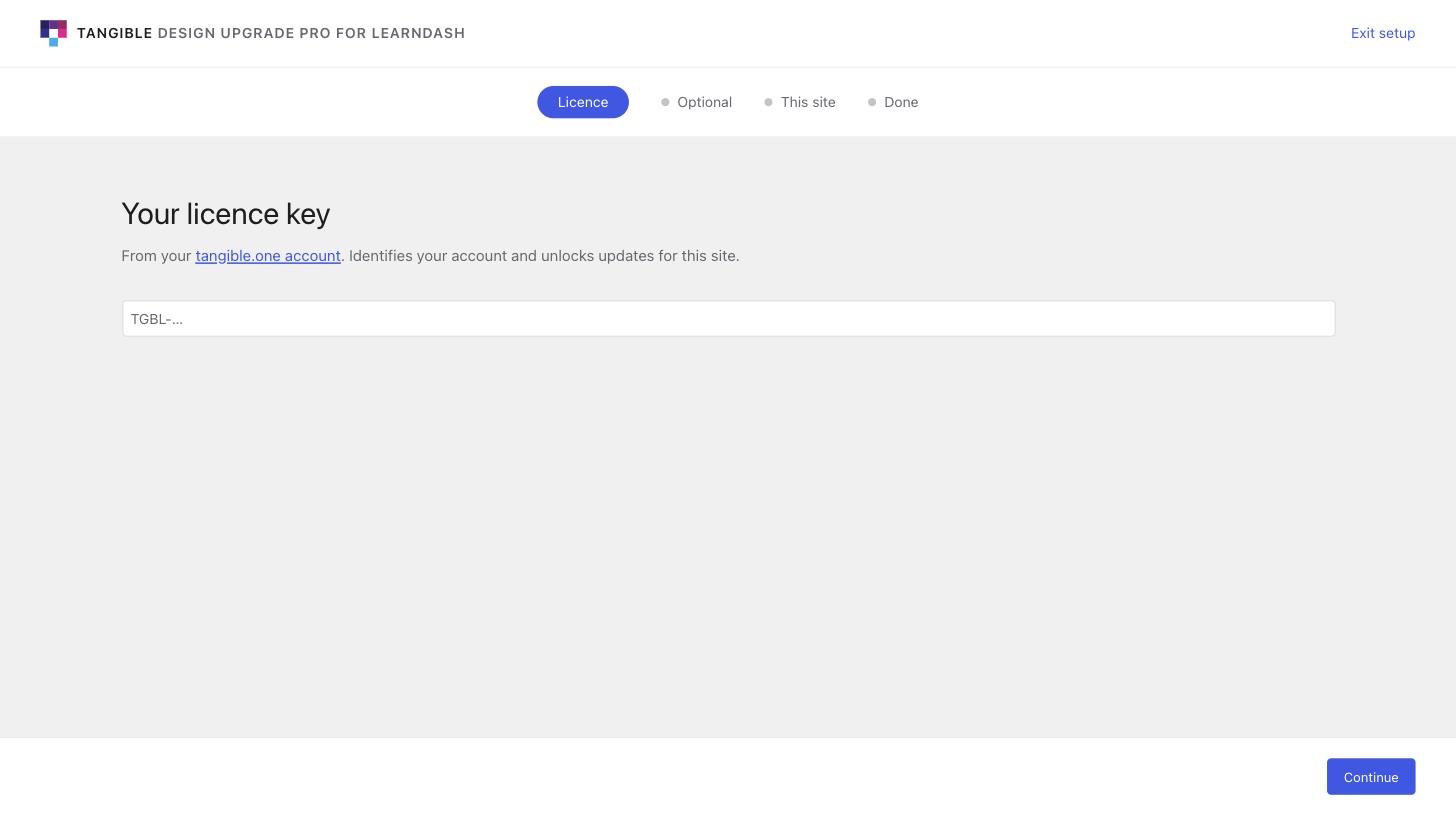
licence, rail label "Licence".1b. Connect to tangible.one Free plugins
Takes the place of the licence step on a free plugin. It is optional and can be skipped. It links the whole site, and every free Tangible plugin on it, to the person's tangible.one account, so their answers follow the account. It disappears once the site is connected.
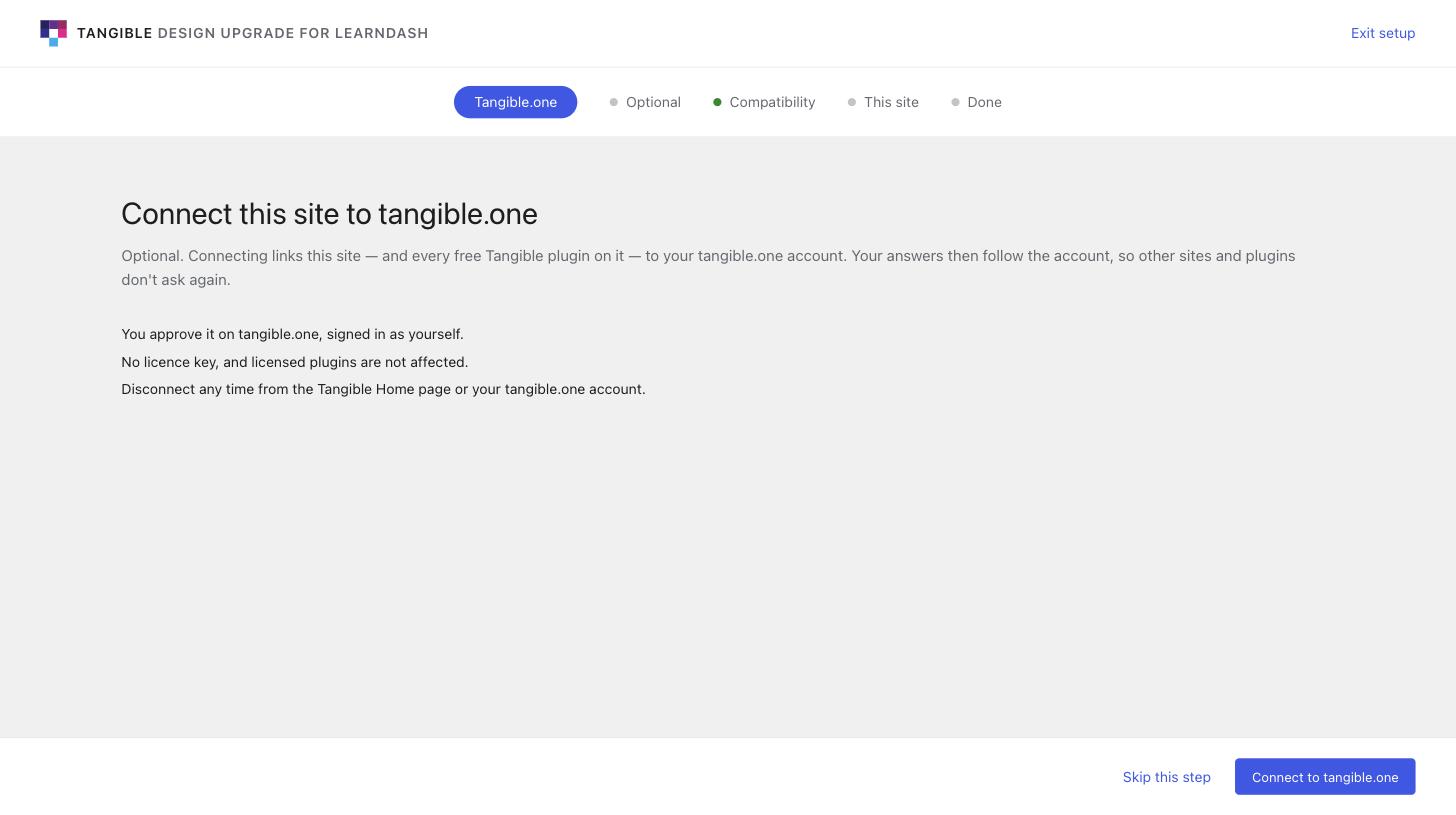
tangible_connect, rail label "Tangible.one". Clicking Connect leaves the site for tangible.one and returns.2. Optional things Consent
The same step looks different on free and paid plugins. A free plugin that is not connected asks two separate questions: share usage data (with the payload shown as the actual numbers that would be sent), and email release notes (with an address field). A paid or connected site has already accepted the Terms through its account, so usage data is not asked here and only the email question remains.
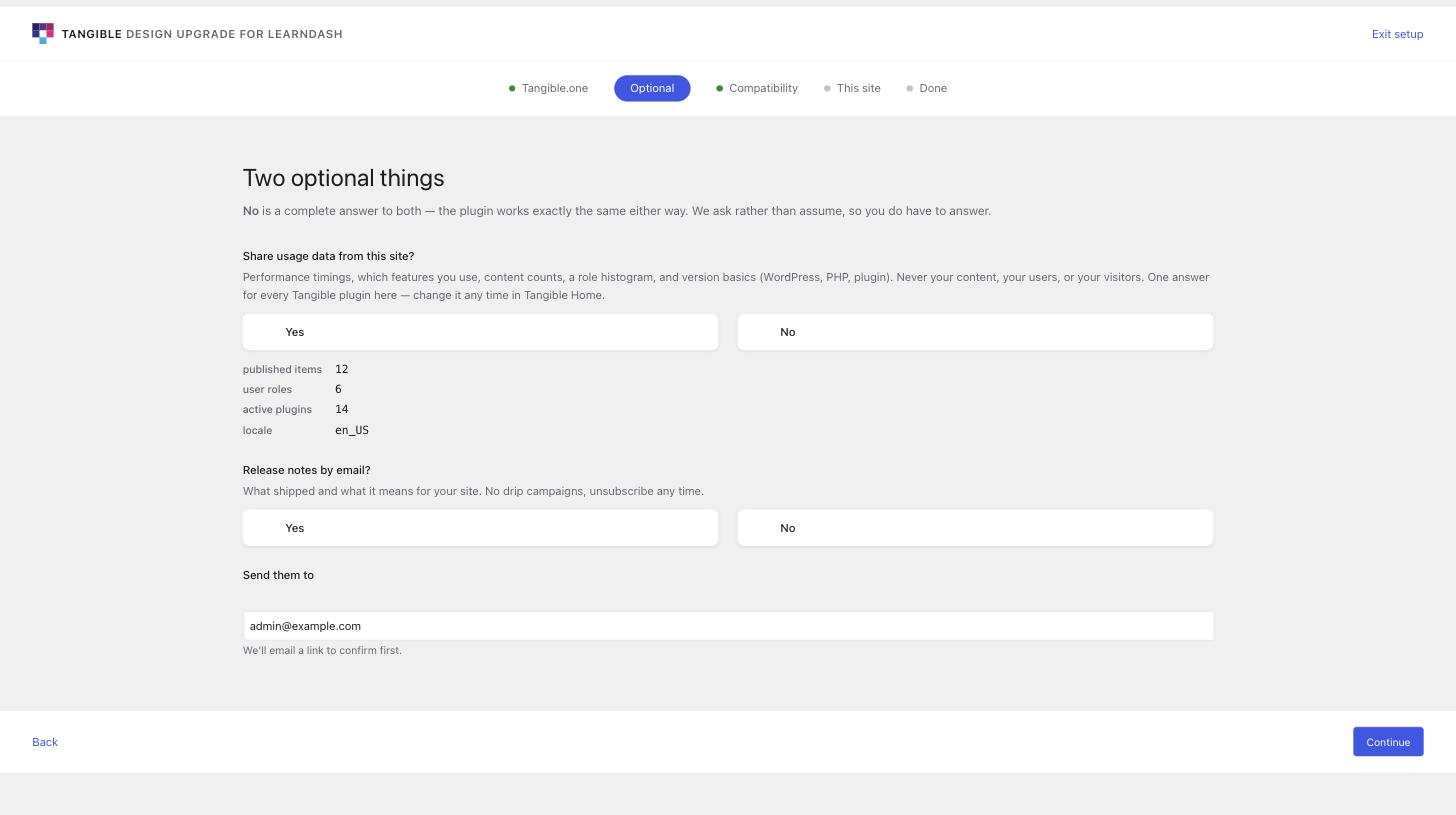
consent, rail label "Optional".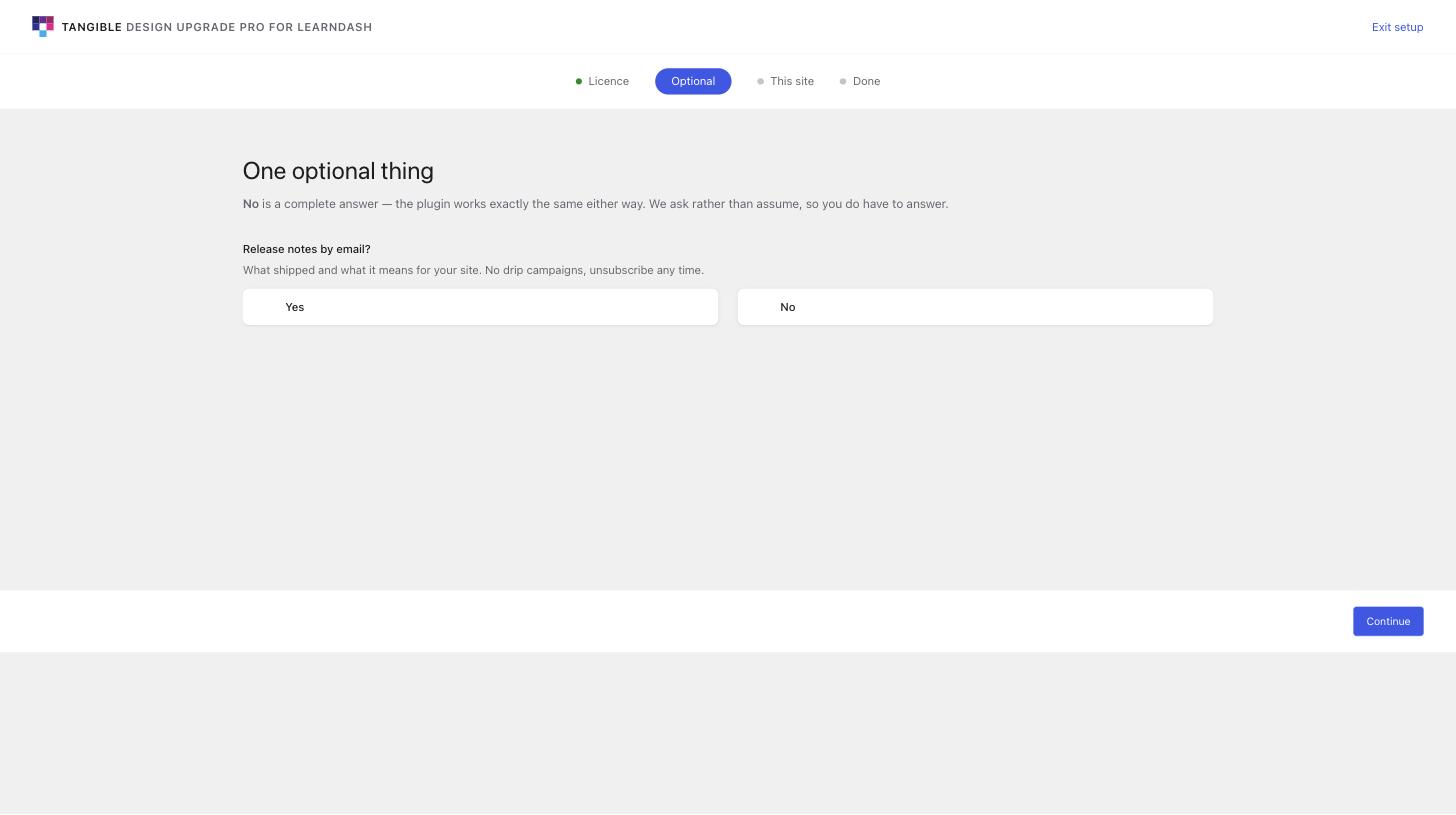
3. Who will look after this site? Steward
Decides whether licence and renewal details show in this admin ("me or my team") or go to the account owner by email ("a client"). It is one answer per site, shared by every Tangible plugin on it, and it is never stored on tangible.one. It looks the same on free and paid plugins.
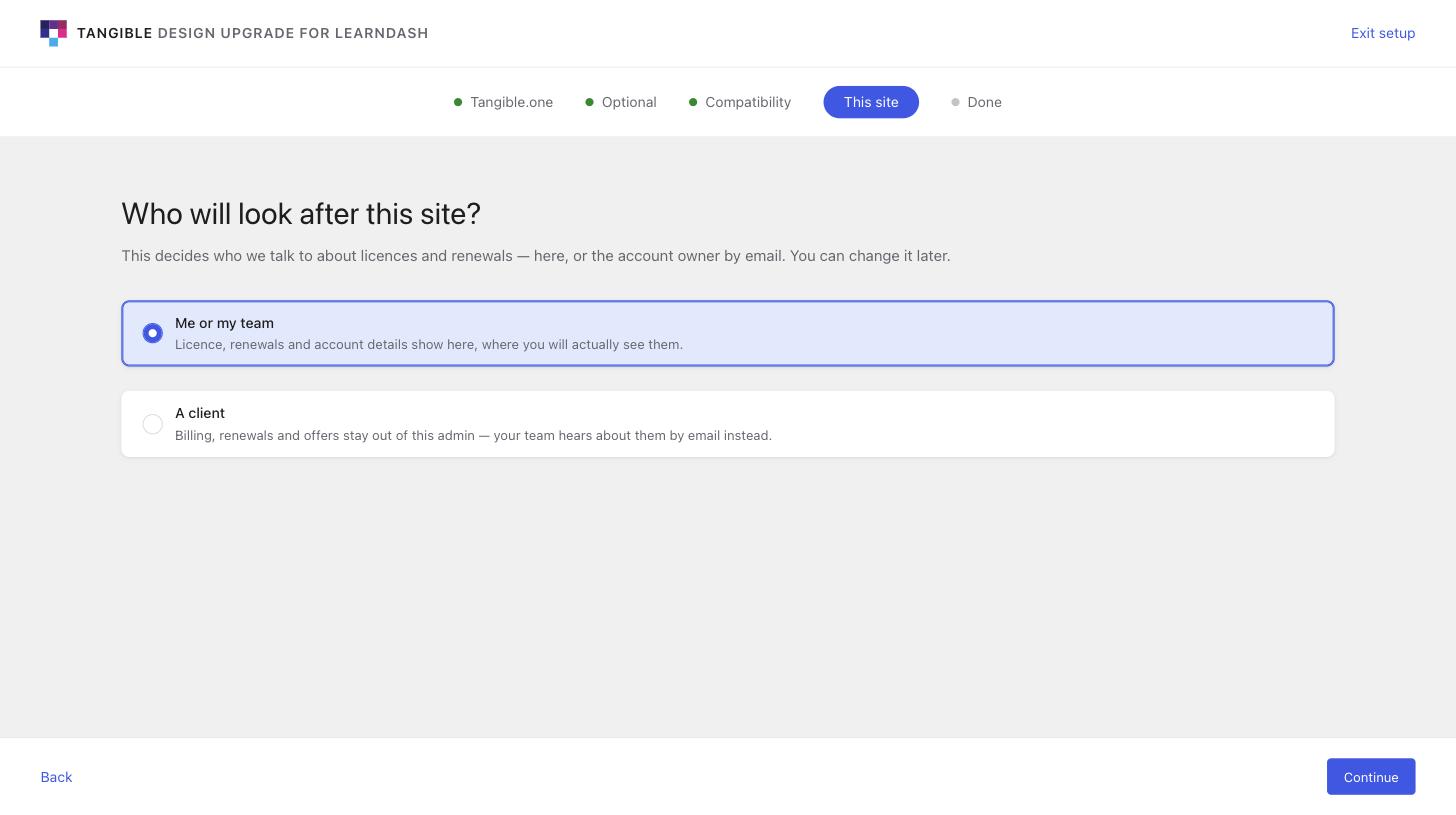
steward, rail label "This site". The selected card is the default.4. Done Closing
The last screen. Its content belongs to the plugin: each plugin sets the summary, the main button and any links through a filter. The framework only provides the frame, so the text here is each plugin's own.
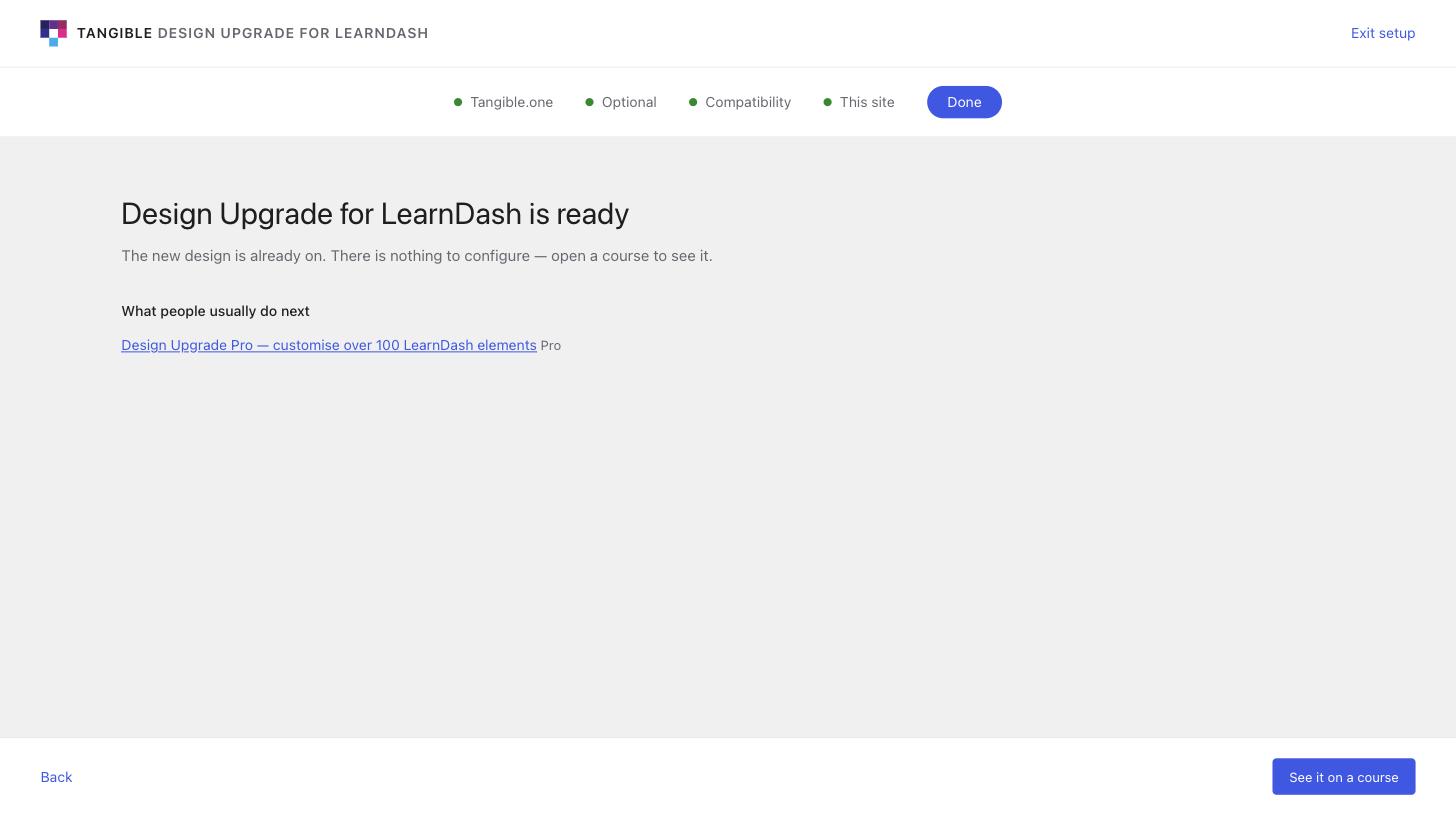
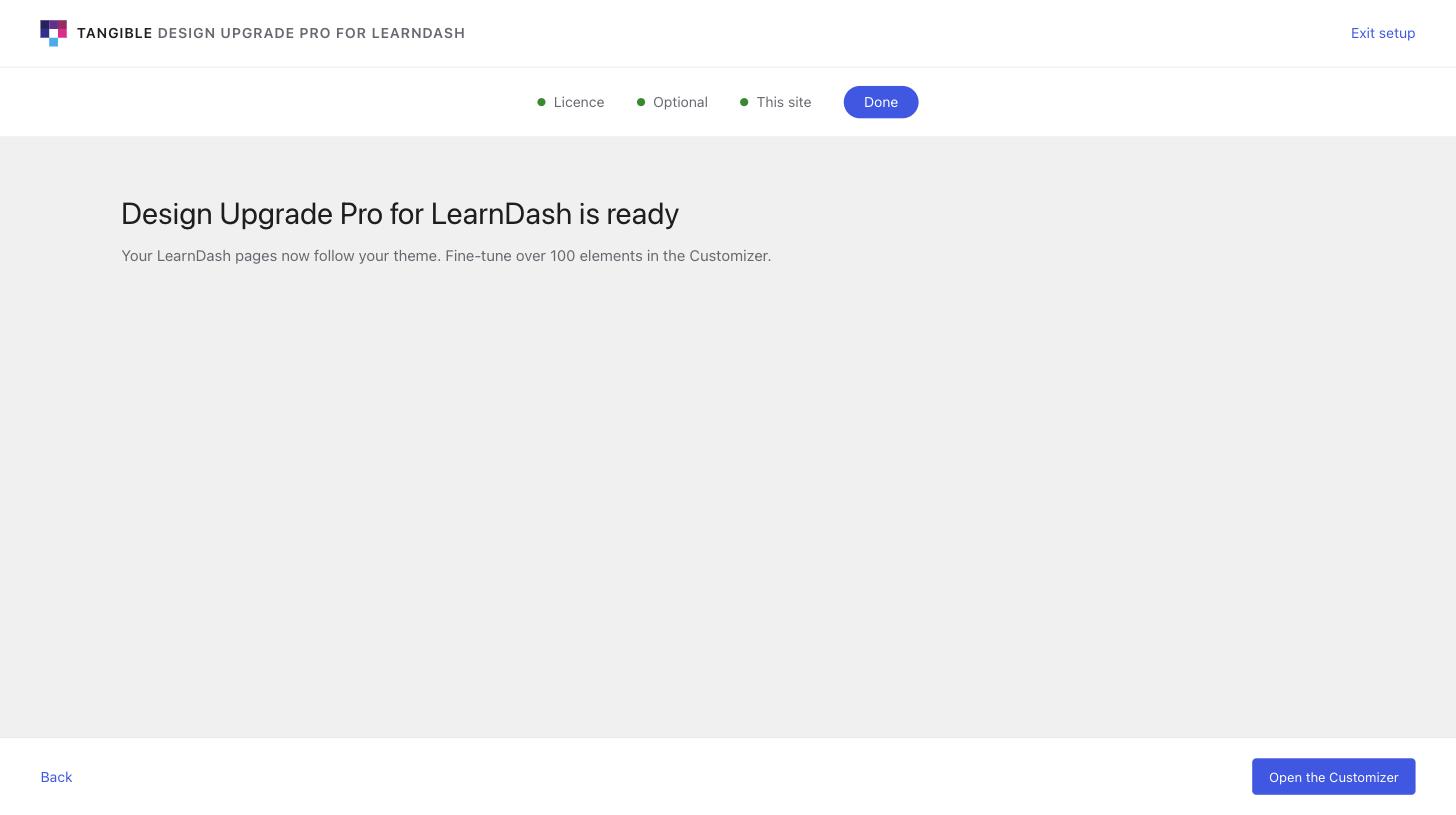
done.Where each screen lives in the code
Line numbers are at 980e19c and will drift. Search for the step id instead.
| Screen | File | Find |
|---|---|---|
| Licence | onboarding/steps.php | 'id' => 'licence' (about line 326). Markup in render, saving in handle. |
| Connect | connect/step.php | STEP_ID and the render closure (about line 48). The hand-off to tangible.one is in connect/flow.php. |
| Consent | onboarding/steps.php | 'id' => 'consent' (about line 432). Which questions appear is decided just above it ($ask_telemetry, $ask_marketing). The Yes/No cards come from render_answer_pair(). The exact wording shown to people is in the TELEMETRY_CONSENT_TEXT and MARKETING_CONSENT_TEXT constants, and that wording is what gets recorded as consent. |
| Steward | onboarding/steps.php | 'id' => 'steward' (about line 547). |
| Done | onboarding/steps.php | 'id' => 'done' (about line 623). A plugin overrides its content with the tangible_onboarding_done filter. |
| Header, rail, footer, buttons, cards | onboarding/wizard.php | render_wizard(), render_stepper(), render_option_card(), render_lockup(). Almost all the wizard CSS is the inline <style> block inside render_wizard(). |
onboarding/wizard.css is a single minified line: the compiled subset of the Tangible UI library (buttons and tokens). Do not edit it by hand. Style changes go in the inline block in wizard.php.
The Hub
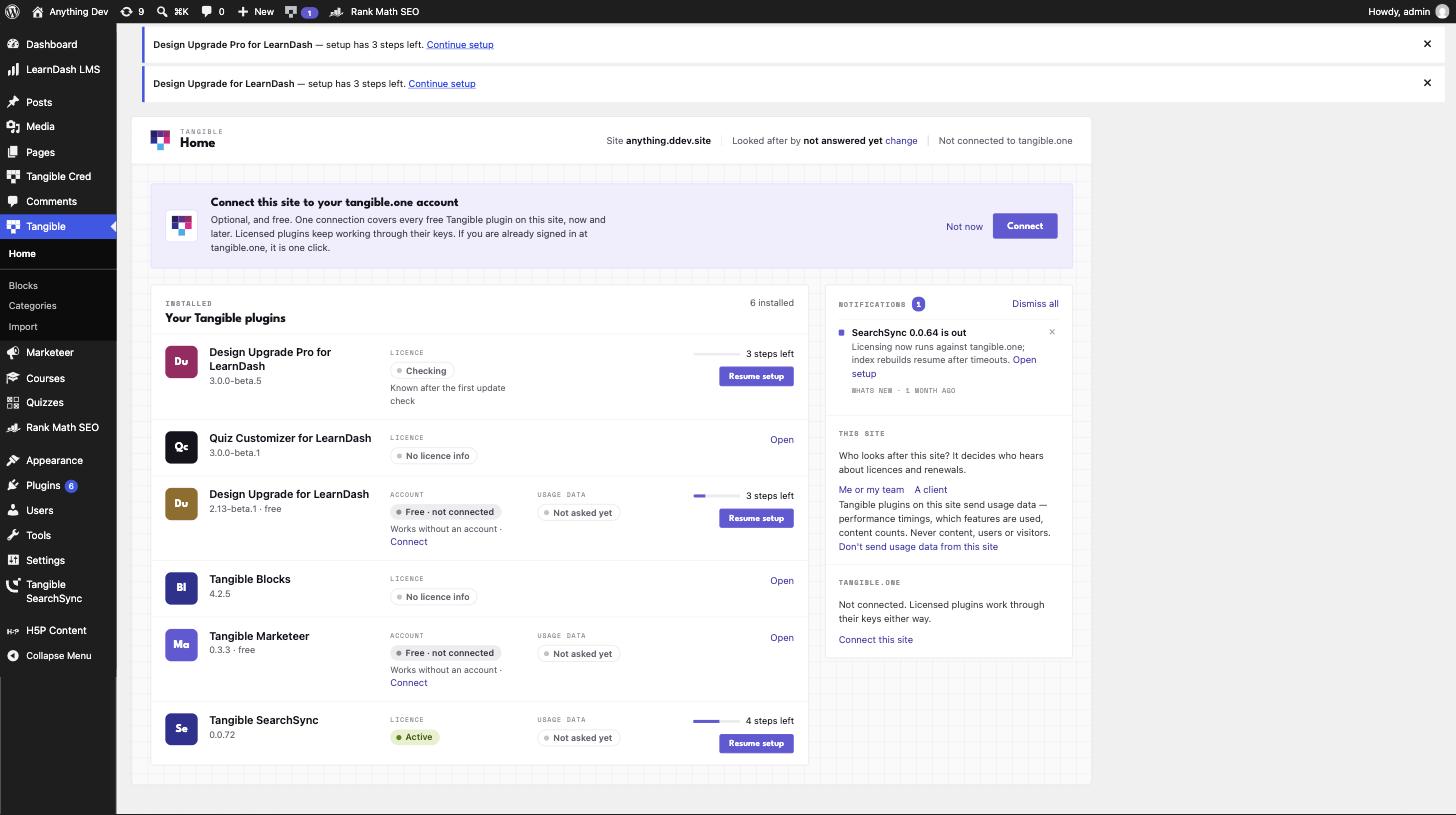
The page called Tangible Home. Its menu entry is Settings → Tangible Hub, and the old wp-admin/admin.php?page=tangible-home address still opens it. It is no longer the first item under the Tangible menu, and the Tangible mark in the admin top bar is switched off for now (PR #26). One page for everything Tangible on a site: the site's tangible.one connection, each installed plugin with its licence or connection state, its usage-data answer and how many setup steps are left (with a button back into the wizard), the notification rail, and the steward answer with a "change" link.
| What you see | File |
|---|---|
| The page itself (header strip, plugin list, side panels), server-rendered | hub/page.php |
| What each plugin row says (licence, connection, usage data, setup progress). Pure functions from facts to text, and tested | hub/rows.php |
| The notifications rail and its dismissals | hub/notifications.php |
| All styling (the "hybrid skin") | hub/hub.css |
Registration (the Settings menu entry), the admin-bar mark (off by default, behind the tangible_hub_show_admin_bar_mark filter), and the list of data sources | hub/index.php (read the comment at the top first) |
The Hub stores nothing of its own beyond dismissals. If a row says the wrong thing, the fix is almost always in rows.php, not in the page.
How to open a PR
- Base branch is
feature/onboarding, notmain. All of this work is on that branch and none of it is inmainyet (it is currently 44 commits ahead). A PR againstmainwould drag all 44 along. The last PR merged this way was #25. - Branch from it. Use a
fix/…orfeat/…name, as #25 did (fix/adr-011-consent-and-connect).git clone git@github.com:TangibleInc/framework.git cd framework git fetch origin git switch -c feat/your-change origin/feature/onboarding - Make the change in the file from the tables above, and look at it on a real site (next section).
- Run the tests. The relevant files are
tests/phpunit/wizard.php,onboarding.php,connect.php,hub.phpandhub-rows.php. They run in WordPress's Docker environment:
CI runs the same suite on every push to any branch exceptnpm install npm run start # starts wp-env (needs Docker) npm testmain, so a failing run shows on your PR. - Push and open the PR against
feature/onboarding. For a visual change, put before and after screenshots at 1440px in the description. For a copy change, quote the old and new text.
Change the wording of a consent question and you change what gets recorded as the person's consent. If you touch TELEMETRY_CONSENT_TEXT or MARKETING_CONSENT_TEXT, say so at the top of the PR so Titus can check it against the platform side.
Seeing your change on a real site
The framework is not a plugin. It runs inside a plugin that ships a copy of it in its vendor/tangible/framework/ folder. Use the two Design Upgrade plugins: one free, one paid. To see your branch, copy the three folders over each plugin's vendored copy (they can lag behind the branch):
FW=/path/to/framework
PLUGINS=/path/to/site/wp-content/plugins
for p in design-upgrade-learndash design-upgrade-pro-learndash; do
  for d in onboarding connect hub; do
    rsync -a --delete "$FW/$d/" "$PLUGINS/$p/vendor/tangible/framework/$d/"
  done
done
Activate one plugin at a time to walk its wizard. The URLs, on a site where they are active:
- Free wizard:
/wp-admin/admin.php?page=design-upgrade-learndash-setup - Pro wizard:
/wp-admin/admin.php?page=design-upgrade-pro-learndash-setup(the pattern is<plugin name>-setup) - Hub:
/wp-admin/admin.php?page=tangible-home
Replaying a screen you have already been through
Answers are stored in WordPress options. To start over, delete them (WP-CLI shown). The first four are shared by every Tangible plugin on the site, which is why a second plugin skips questions the first one already asked:
wp option delete tangible_onboarding_state__site
wp option delete tangible_consent_outbox     # consent answers
wp option delete tangible_site_steward       # steward answer
wp option delete tangible_connect_site       # disconnects the site
wp option delete tangible_onboarding_onboarded
wp option delete tangible_onboarding_state__design-upgrade-learndash
wp option delete tangible_onboarding_state__design-upgrade-pro-learndash
Free or paid
Which plugin shows Connect and which shows Licence follows from the plugin itself: the free one carries a cached "free" verdict (ldx_free_distribution), and the Pro one has none, which counts as paid. On the test site the Pro plugin also has its platform product id switched on in its main file (a comment there says to revert it before shipping), which is what makes the Licence step appear. The Licence step cannot be passed without a valid key. To walk the steps after it without one, filter tangible_onboarding_facts in a throwaway mu-plugin and set licence_active to true.
Keep local testing off production
Both Design Upgrade plugins and the Connect step talk to tangible.one. For Connect, you can point a local site at staging by defining these two constants (a mu-plugin is fine). Staging skips the site-verification callback for *.ddev.site, which production cannot reach:
define('TANGIBLE_CONNECT_APP_URL', 'https://staging.tangible.one');
define('TANGIBLE_CLOUD_API', 'https://api.staging.tangible.one/');
If you only want to look at the screens, block requests to tangible.one with a pre_http_request filter and nothing is sent.
Rules the code already enforces
These come from comments in onboarding/steps.php and exist for a reason. A PR that breaks one needs a conversation first.
- Consent is a forced, unbiased choice. Yes and No are the same size and weight, nothing is preselected, and Continue refuses until every question is answered. The server enforces it; the small script on the page only makes the button react sooner.
- The consent payload is shown, not linked. People see the actual values that would be sent.
- Consent questions are never bundled into one yes/no.
- "No" is a complete answer. The plugin must work the same either way.
- Usage data is asked only of a free plugin that is not connected, once per site. A licensed or connected site's account has accepted the Terms.
- Licence is always first, never skippable, and absent on free plugins.
- A step with a malformed definition throws instead of being skipped, on purpose: a consent step that silently disappears would read as "already answered".
For the reasoning behind these, see the two specs in the tangible-one repo: .docs/specs/plugin-onboarder.md and .docs/specs/tangible-connect.md.
If you are changing the design
The design reference is the pair of static mockups in the design catalog, which share their colours and type so the wizard and the Hub read as siblings:
The PHP is what actually ships, so a design change is only done when it is in a PR against the files above. A few constraints:
- League Spartan is the heading face (open licence, so it can ship inside a plugin ZIP). Recoleta is commercially licensed and must not appear in plugin code.
- The mockups are static, and some of what they show is not wired up in the code.
- Both screens render inside WordPress admin. Check your change on a site with other plugins active, not only a clean one (the Hub screenshot above shows other plugins' notices sitting on the page).